

Hey there, are you wondering about the best tools for b2b lead generation and email marketing for your clients?
Here are the best tools I am using for my lead generation services for small businesses and startups.
These tools helped me fetch a lot of outbound leads for my businesses.
If you are a lead generation freelancer like me, you will be surprised after you get to know about the following tools. And you chose a nice career for your career, why? Because a lot of businesses and startups are struggling nowadays with a low number of leads for their business or low-quality leads.
Check the screenshot from fiverr.com

For the search term b2b lead generation, 18k people are offering this service, even though you have more competition, but as per marketing law, you have to enter the market with competition because competition implies how best the market is.
Okie! What is B2B lead generation?
B2B lead generation is the short form of Business-to-Business lead generation, where one business exchanges value with the other business. For example, Udaan is a business that supplies goods for smaller businesses.
B2B lead generation service is the process of finding an ideal customer for your clients to purchase their products or services, and initiating interest in their potential customers’ minds about your clients.
Before getting into the tools list, you have to know that, all B2B businesses doesn’t need lead generation. Yes, you heard it right, check below.
Do all B2B need lead generation?
The answer is NO!
Here is where people tend to make mistakes: they reach every B2B company and pitch their B2B email marketing and lead generation services.
But some highly complex B2B companies don’t need leads, for example, Infosys and SpaceX don’t need lead generation for their businesses; they need a strong brand and pitch only. And some low-end products and low-end consumer goods (B2C product companies) like Hamam, All Clear, don’t need lead generation for their businesses; all they need is marketing.
So lead generation is needed for:
- High-priced B2C products like Cars and real estate.
- Low-end B2B products like digital marketing and IT services.
Having said that, now let’s see the tools list, the main body of this post:
Top 10 email marketing B2B lead generation tools:
Tools are an important part of Lead generation. If you want to become an expert lead generation freelancer, you need to have a clear idea about all these tools in the market that are available. There are three types of tools needed for lead generation
- Email extracting tools
- Outreach Tools
- Lead Management Tools (CRM)
Email extracting tools:
-
Snov.io
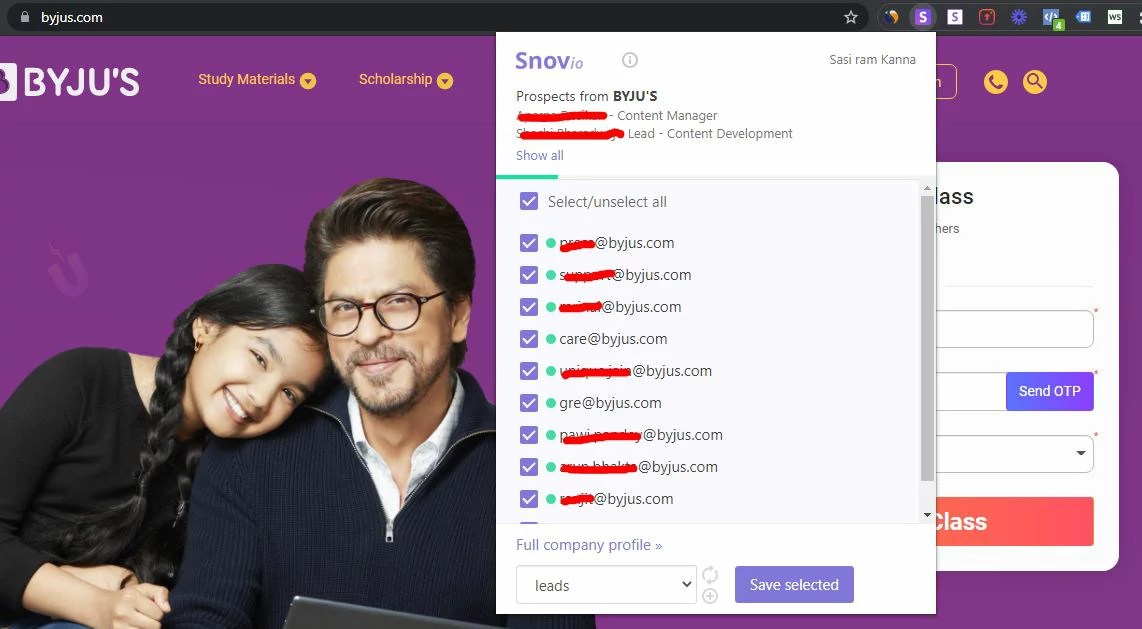
Snov.io is an amazing tool that helps to find emails from the website.
You may ask me, ” Bro! Emails will be available on their contact page itself, so why do we need Snov.io?”
But the email available on the contact page will be either the support or info email address only.
Snov.io can help you extract every email ID available on their website, including the email IDs of CEOs, Managers, Decision-makers, etc. It is always recommended to reach the high-level people in the company to get a contract for your services.
Using Snov.io is simple
- Sign up for Snov.io
- Add the Snov.io Chrome extension.
- Visit your ideal client’s website and click the Snov.io Chrome extension to get the email IDs from that website.
- Do a little research on the about page on their website to find the decision-makers. And you can reach them.
For example, if you want to get the email of the CEO of any food company, go to their website, click on this extension, and it will show a list of email IDs. If you know the CEO’s name, you can find it easily.
-
Findthatlead.com
It is similar to the Snov. Here you can extract emails from everywhere, and this one tool is enough for all your lead generation campaigns. You can get:
- Email IDs from persons’ social media profiles, like LinkedIn and Twitter
- From their prospect tool, you can extract email IDs based on location, keyword, job title, company name, company size, etc.
- You can verify those emails you got.
- You can even create a drip marketing campaign using this tool.
However, they provide only 50 credits per user on the free version. If you want to get more than 50 person’s Email you can check their premium plans.
I would recommend taking this tool if you are starting.
-
Lusha
From the above tools like Snov and find that lead, you can get email IDs only, but here in Lusha, you can get their contact numbers also. During COVID-19, the phone is the best way to reach your prospects, right?
- Here also you can also get your prospect’s contact details using prospecting tools.
- Create a list of prospects, and you can modify it any time.
- Work with your team; you can assign them any role, like salespersons, marketers, etc. You can hire people and give them access to your account; they will take care of the sales calling and other processes.
They give free credits at the start to people to check how lusha.com works, and you can try the advanced features for free for 14 days. Click the link below to get the free 14-day trial.
-
Getprospect.io
This tool has an amazing Chrome extension that will extract leads from the LinkedIn search results pages. I used this tool to generate a list of CEOs and Managers to apply for my lead generation job in the UAE.
Similar to the find that leads, here also you can very the emails you get and you can manage them here with their inbuilt CRM tool. But I prefer this tool to get leads from the LinkedIn email finder Chrome extension.
What you have to do is:
- Log in to your LinkedIn profile and search for keywords like social media managers in people. You will get a list of social media managers.
- Then you have to install the LinkedIn email finder Chrome extension. After installing, you will find a checkbox near the name of the profiles
- Click the people you want to get emails from, then click Save in the extension.
- You can find the leads in your dashboard, you can verify them there, and you can send emails and so on.
You will get 100 free credits per month. It is enough to get started, and later, after you start getting more income, you can get their premium versions.
Outreach tools
The tools we are gonna see here are used to reach your Prospects and communicate with them. You can directly mail them after you get their emails. In case you have more emails, mailing them one by one is not possible. For that, I would recommend the following tools:
-
Mailshake
It is an email sending tool; here, you can send emails with your G Suite account. The main advantage of Milkshake over other email sending tools like Convertkit and Mailchimp is here you can send personalized emails from your Gmail account, which will result in a high open rate of around 40% based on your content and headlines.
Why, because not all the emails will be sent at the same time, it will send emails one by one with time-space between them. So the emails don’t look like promotions or spam. The chances of getting your emails in the primary inbox are very high.
You can see how many people responded to your emails, and you can add them to your CRM. You can even see the emails you send in the sent section of your G Suite account.
The steps involved here are:
- Sign up for the Mailshake accounts, add your professional email ID, and create a new campaign.
- Then upload the list of leads with the email you got from the above email-extracting tools.
- After that, compose a personalized email and preview it before you send it.
Simple and easy steps, right?
The next tool in our list is
-
Woodpecker
Woodpecker is the initiative cold email tool. In this, the cool feature is that it allows you to A/B test your email copies so that you can measure which email copy is performing better. Most importantly, you can add up to 5 email copies.
Here you can able to take your leads through a Funnel. Also like, if they responded to an email asking for an appointment, you can book a call with them; if they haven’t responded, you can send a follow-up email. Moreover, you can automate all of these processes with Woodpecker.
And you can add prospects in four different ways:
- Uploading a database (CSV file)
- From files,
- You can add manually
- You can also add through integration.
This is similar to Mailshake. Every step is the same. On the other hand, they are providing a mobile app so that you can view your Woodpecker account and make a call to your prospects.
-
Klenty
This is another email sending tool and also known as a lead-nurturing tool. Klenty specializes in having high sales engagement. Klenty has high engagement because:
- It helps you to send highly personalized emails
- It sends emails at regular intervals to make sure your emails are landing in the prospect’s inbox.
- Through insights, you will get a clear idea about your email campaign’s performance.
With all these features, it helps you to send Hot leads to your CRM. (You will learn about it more in the sections below).
klenty claims that “Klenty + your CRM = great sales stack”. What do you think?
-
Contact Us page
I know this is not a tool, but it is one of the easiest outreach methods now.
At the starting stage of your lead generation freelance career, it might be difficult to pay for the tools, so you can start with this method to reach out to people. After you get more leads and sales, you can switch to the advanced tools I mentioned above.
Note: while sending emails from their contact page, remember to have a killer outreach template to get a high number of replies to your email. Don’t use your Gmail, Outlook, or Yahoo email ID, use a custom domain email ID to get better open rates.
Here are some of the best email outreach templates, check here.
-
Social media DMs
This is similar to the above method, but instead of contacting them through their website, you contact them through Social media Direct messages.
Though the response rate is low, I would recommend doing this on the side as well, because most of our ideal clients are hanging out on social media only. Be sure about the number of DMs you can send through certain Social media Accounts; otherwise, there is a chance of getting your account banned.
Again, having a great outreach template and strategy is needed in social media DMs also.
Lead management Tools:
These tools help to organize, manage, tag, and segment your leads. You can assign a salesperson to call the lead, also. These tools are performing a function called customer relationship management (CRM). Simply saying CRM is the upgraded form of a spreadsheet. The best CRM tool is:
-
Pipedrive
Here you can segment the leads based on qualified, unqualified, negotiation started, demo stage, and closed. Like this, you can segment your prospects.
The cool thing is that Pipedrive is very user-friendly. You just have to drag and drop the leads in the above segments. Some other advantages are:
- Cheaper than most of the CRMs out there.
- Easy to use
- Easy to set up
- You can expect a higher percentage of sales conversion because Pipedrive makes your process easy, so you will have more time, more research, and above all, you will have more conversions.
Conclusion:
To sum up this article, I would like to add a small piece of advice or hack, anything, you name that.
All these tools are paid tools. If you don’t have a budget for these tools’ subscription, what I would recommend is that, select one tool from the above. And sign up for the free trial, get the maximum out of each tool, and try to close a sale with this tool. Then invest that sale amount you got in the paid version of these tools.
Whatever the tool you choose, if your email marketing campaign is weak, you won’t get many conversions from it. If you would like to read more about email marketing, check this article by my friend Srideepa on her blog.
If you want to learn more about these tools in detail and want to see the demo of how they work, Digital Deepak has created a course named Digital Marketing Tools Mastery Course. There, you will get a full-depth understanding of each tool required for digital marketing.
- Before you start reaching out to leads, make sure your website is ready—here’s my guide on setting it up with Bluehost.
- Find out more about digital marketing from Sunitams here. He is a digital marketer with more than 5 years of experience. And learn digital marketing with a scholarship of up to 95% from him.
cheers,

I work at the intersection of SEO, performance marketing, and AI automation leading 40+ projects and 15+ clients while keeping ROI at the center. Outside of work, I’m a book lover, Potterhead, and someone who can’t resist writing reviews, whether it’s on Goodreads, IMDB, or even Google Maps. For me, marketing is about creativity, curiosity, and turning ideas into real growth stories.